


Garmin Golf
4.71.96K Reviews
App Specs
- Version
- 3.9
- Updated On
- License
- Free
- Downloads
- 1,000,000+
- Developer
- Garmin
- Categories
- Sports
- Platform
- Android, iOS
Screenshots
 Analysis by AppCompare
I tend to get more out of a golf round when I can compare what I thought happened with what I actually scored. Garmin Golf is built around that kind of feedback: it gives golfers a way to record rounds, follow friends’ scores and make competition part of the experience. The useful question is not whether an app can make a swing better on its own, but whether it helps you notice patterns and stay engaged between shots. For me, its strongest appeal is the shared scorekeeping, with performance tracking giving that social side a practical purpose.
Getting More from a Round
Garmin’s sports app is free to download, and the company’s golf focus is clear from the way it brings scorecards, player comparisons and leaderboards together. It has an average rating of 4.2 from around 21,000 ratings, and more than a million installs. It is rated for Everyone, so it can suit a broad range of golfers. The current version is 3.6.1, and the app has been available since May 31, 2017. Optional in-app purchases range from $9.99 to $99.99 per item, so I’d check what a particular purchase covers before deciding it is relevant to your own use.
That combination makes the app easier to approach than a dedicated training system. You can use it as a companion for a round rather than building your whole golfing routine around it. Garmin devices can add a connected experience, while the app can also be used independently, which is useful if you want to explore its golf tools before committing to a Garmin wearable or GPS device. I would still think of it primarily as a round-tracking and competition companion, not as a substitute for instruction from a coach.
Why Shared Scoring Is the Main Draw
The social scorekeeping is more than a digital replacement for passing a paper card around. Recording scores in the app gives your group a common reference during a round and makes it easier to keep friendly competition visible. When I play with regular partners, that can make an ordinary outing feel more involving without turning every hole into a high-pressure contest. You can focus on your own game and still see how the round is unfolding among the people you know.
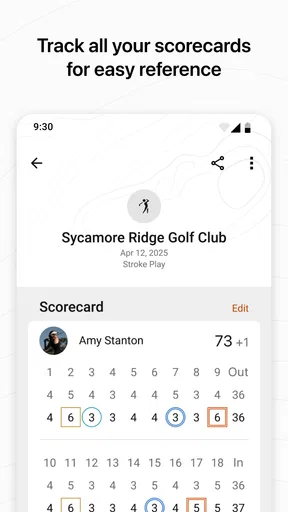
That shared record also creates a useful starting point for reflection afterward. Instead of relying on a vague impression that a round went well or badly, you have scores and performance information to look back on. It does not explain every cause behind a result, but it can help you decide what to pay attention to next time. The best use of the app is as a consistent record of your rounds, not as an instant verdict on your ability.
How It Fits into a Real Round
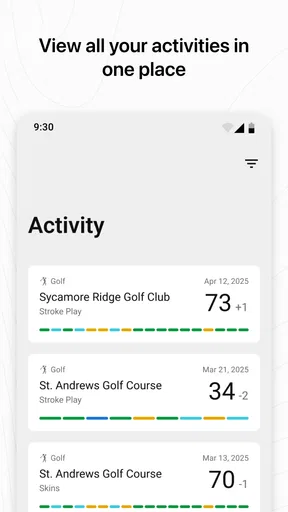
Imagine meeting your usual group after work for a casual round. You can keep the score digitally as you play, check how your friends are doing and make the competition feel a little more lively. Later, performance stats such as strokes, putts per round and drive distance give you details to compare with your own recollection. If you felt that putting let you down, for example, the recorded information gives you a reason to pay closer attention to that part of your next round rather than trying to fix everything at once.
That workflow is most useful when you enter information consistently. A half-filled scorecard or missing details can make later comparisons less meaningful, so I’d make a simple habit of recording the round as it happens instead of trying to reconstruct it from memory. If your group would rather talk and play without checking phones, keep the app use brief and let the scorekeeping support the day rather than dominate it. The app should make the round easier to review, not distract you from being on the course.
Worth Reading Before You Choose

Flipboard Shows What News Apps Must Do Beyond the Feed

Switching to Android Auto Means Rethinking Your Driving Routine

Google Calendar Makes a Crowded Week Easier to Manage

Ludo King Makes the Most of the Minutes Between Plans

Baby Panda World Brings Quick Play to Modern Phones, but Its Game Library Feels Busy

ESPN’s Live Game View Makes Following Close Games Easier
Competition Without Losing the Casual Feel
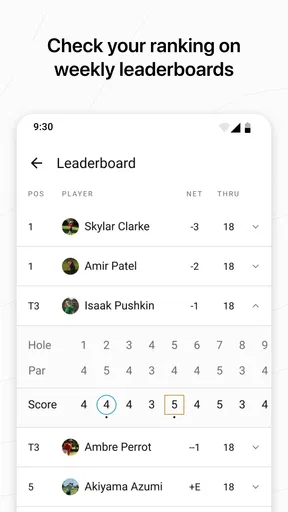
Live scoring and leaderboards give golfers another reason to stay involved, especially when a tournament or friendly challenge is underway. Seeing how scores compare in real time can add suspense, while weekly leaderboards and global challenges offer a broader way to compete. I like that this can be a small extra layer rather than the whole point of playing: you can use it with friends when everyone is interested, then ignore the competitive side when you simply want a relaxed round.
There is a trade-off, though. Leaderboards can motivate you, but they can also pull attention away from your own goals if you start measuring every round against someone else’s. I’d treat rankings as context, not as a coaching plan. A friend’s score may reflect a different course, day or playing style; your own records are usually more useful for deciding whether your game is moving in the direction you want.
Course Information and Connected Use
The app’s course database is intended to make golf information useful both at home and when travelling. Having course maps and data available can help you get oriented before playing somewhere unfamiliar, while a familiar course gives you a setting for comparing rounds over time. I would still check the course information before relying on it for a particular outing, especially if you are planning around a course you have never played. A digital guide is most helpful when you use it to prepare, not when you expect it to replace your own awareness of the course.
Garmin device integration is a meaningful advantage if you already use compatible Garmin golf gear, because it can make the app part of an existing routine. If you do not own one, independent use gives you a way to try the scorekeeping and community features without buying into that ecosystem first. That distinction matters: someone who wants a simple scorecard may find a basic golf scoring app less involved, while someone who values Garmin connectivity and shared competition has more reason to explore this one.
Where the Experience Can Feel Less Convenient
Using a phone during a round is not ideal for everyone. Some golfers prefer to keep a device tucked away, and others find repeated score entry interrupts the rhythm of play. If that sounds like you, a paper card or a dedicated golf watch may feel more natural. A watch can keep essential information closer at hand, while paper avoids battery and screen concerns; the app’s advantage is that the score and social elements can be brought together for later review.
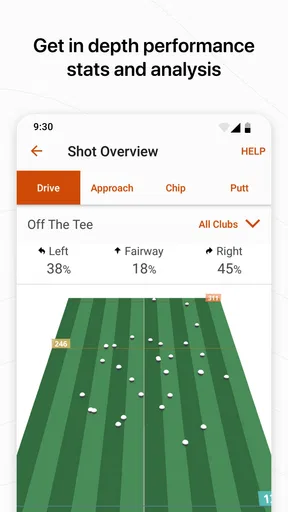
The stats also require a little restraint. Numbers such as putts per round or drive distance can point toward questions worth asking, but they do not capture every detail of a shot or explain why it happened. I would use them to spot a recurring area to work on, then pair that observation with practice or advice from someone qualified. If you want automated swing diagnosis or a structured training program, this is not the first tool I would choose.
Who Will Get the Most Out of It
I’d recommend it most to golfers who play regularly with friends, enjoy a bit of competition and want a record they can revisit after the round. It is also a sensible option for Garmin users who would rather keep golf activity connected to equipment they already use. Newer players can benefit from seeing their scores and basic performance patterns, provided they treat those records as learning material rather than a measure of whether they belong on the course.
On the other hand, golfers who rarely record scores, dislike using a phone while playing or have no interest in leaderboards may not get much from its social focus. A paper card is simpler for a quick casual game, and a specialist coaching tool is a better fit if detailed instruction is the priority. Before downloading, I’d ask myself one practical question: will I actually enter scores and look back at them? If not, the app’s central strengths may stay unused.
A Practical Way to Start
If you decide to try it, I’d begin with one familiar course and one round with people who are happy to share scores. That keeps the first experience low-pressure and lets you see whether live scorekeeping fits your pace. Afterward, look at just one or two performance details rather than trying to interpret every number. Over several rounds, that focused approach is more likely to reveal a useful habit than checking stats once and drawing a sweeping conclusion.
It is also worth agreeing with your group on how competitive you want the round to be. Some friends will enjoy a leaderboard; others may prefer to keep the score between the players. The app can support either mood, but a quick conversation makes the technology feel like part of the outing rather than an expectation imposed on everyone. Notifications can help you keep up with golf-related activity, though I would keep them from becoming a distraction if you prefer a quieter phone during play.
Features That Enhance Your Game
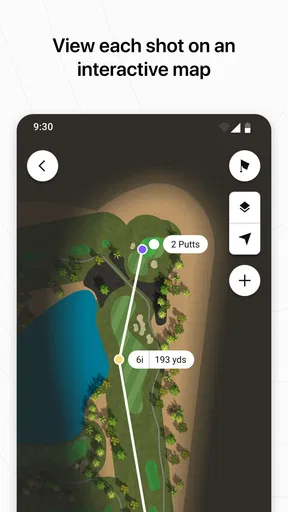
Now, let's talk features. The app boasts an impressive range of functionalities designed to help you get the most out of your time on the course. The course database is vast, covering over 42,000 courses worldwide. So, whether you’re playing locally or traveling, you’ve got detailed maps and data at your fingertips.
The scorecard feature is a standout. Forget about pencil and paper; you can track your scores digitally, making it easy to see your progress over time. Plus, it allows you to keep tabs on your friends’ scores if you’re in the mood for some friendly competition. I found this particularly useful when playing with my regular group. It adds an extra layer of fun to the game.
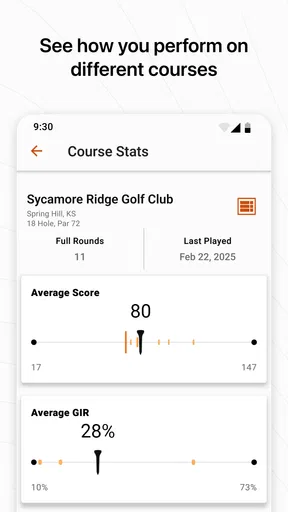
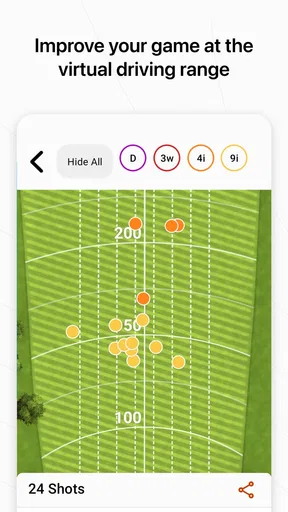
The app also offers performance stats. You can track your strokes, putts per round, and even monitor your drive distance. This data is invaluable if you're looking to analyze your game and identify areas for improvement. It's like having a personal coach giving you insights after every round.
Live Scoring and Leaderboards
One of my favorite features is the live scoring. If you're the competitive type, you can participate in tournaments and see real-time leaderboards. It’s exciting to see how you stack up against others, and it’s a great motivator to push yourself that extra mile.
The leaderboards are well-organized and easy to read. You can filter by different criteria, making it simple to find where you stand. Whether you’re playing casually or in a serious tournament, this feature keeps you engaged and informed.
Community and Connectivity
Another aspect worth mentioning is the community feel of the app. You can join weekly leaderboards, compete against friends, and even participate in global challenges. It's a social experience that adds another dimension to your golfing. Plus, being able to connect with fellow golfers worldwide is a fantastic way to share tips and tricks.
The app also supports smart notifications, so you never miss an important update. Whether it’s a weather alert or a message from a friend about an upcoming game, you’re always in the loop. This connectivity is convenient, especially when planning games or keeping up with your golfing buddies.
Wrapping Up
All in all, the Garmin Golf app is a must-have for any golfer looking to up their game. Its wealth of features, ease of use, and engaging community make it a standout choice. Whether you're a casual player or a seasoned pro, there's something here for everyone. So, why not give it a shot? Download the app, hit the course, and let Garmin Golf help you play your best game yet.
With its seamless integration, intuitive design, and robust feature set, this app isn't just about improving your golf. It's about enhancing your overall experience, making every round more enjoyable, and connecting you with a community of like-minded enthusiasts. Trust me, once you start using it, you'll wonder how you ever played without it!
Pros
- Intuitive interface for easy navigation.
- Detailed statistics to improve your game.
- Seamless syncing with Garmin devices.
- Comprehensive course database worldwide.
- Real-time scoring for tournaments.
Cons
- Some features require premium membership.
- Occasional connectivity issues reported.
- Limited free features available.
- Battery drain on continuous use.
- Inconsistent updates for new courses.
FAQs for Garmin Golf
What features does the Garmin Golf app offer?
The Garmin Golf app provides a comprehensive suite of features for golf enthusiasts. It includes detailed course maps, real-time scoring, and performance statistics. Users can track their handicap, participate in weekly leaderboards, and join tournaments. Additionally, the app offers insights into swing tempo and club performance, enhancing the overall golfing experience.
Is the Garmin Golf app compatible with all Garmin devices?
The Garmin Golf app is compatible with a wide range of Garmin devices, including Approach series watches and handhelds. However, it’s essential to check the specific compatibility of your device model with the app. Regular updates are rolled out to improve compatibility and add new features, so ensure your device’s firmware is up to date.
Does the Garmin Golf app require a subscription for full access?
The Garmin Golf app is free to download and offers many features at no cost. However, some advanced features, such as detailed swing analysis and premium tournament entries, may require a paid subscription. It's worth reviewing the app's in-app purchase options to decide if the premium features align with your golfing needs.
Can the Garmin Golf app track my performance over time?
Yes, the Garmin Golf app is designed to track your performance over time. It logs a variety of metrics, such as scores, fairways hit, and greens in regulation. This data can be analyzed to identify trends and areas for improvement. The app’s performance analysis tools help golfers fine-tune their game and achieve consistent progress.
How accurate is the GPS functionality in the Garmin Golf app?
The GPS functionality in the Garmin Golf app is highly accurate, leveraging Garmin's advanced GPS technology. It provides precise yardages and detailed course maps for thousands of courses worldwide. However, GPS accuracy can be influenced by environmental factors, so it's recommended to regularly update the app and maps for optimal performance.


